Wednesday, July 24, 2024

HOW MUCH DOES IT COST TO DEVELOP CUSTOM CRM SOFTWARE FOR THE REAL ESTATE INDUSTRY

Summary:

The average estimated cost of developing custom CRM software is $25,000 to $200,000 or more depending on the requirements. This blog explores the factors that can influence the cost of developing Custom CRM Software, such as the scope of the project, technology stack, development team size, and location. It emphasizes the benefits of having custom CRM software along with the importance of choosing the right development partner to ensure the success of the project.

Introduction

In the global market, CRM Software is forecasted to grow to 49.6 billion USD in 2025. Around 91% of companies globally have some or the other CRM software to manage their customer data. If you have not found any relevant CRM solution that fits your business model, you also have the option to design and build custom CRM software that can map your business process step by step. In case you want to understand more about Custom CRM solutions, you can read our ebook on Custom real estate CRM solutions.

Custom CRM Software comes as the best solution for your Real Estate Industry. It makes you stand out from the crowd in this competitive market. Working with a custom CRM will create a unique identity for your real estate business. Before that, you will be eager to know how much real estate CRM software costs. Let’s have an overview of cost with different factors.

Read more: What is a Custom CRM Software in Real Estate

Cost Factors of Custom Real Estate CRM Software: Leverage Free estimating software for Accurate Estimates:

Whether it’s custom CRM software or a ready-made CRM solution, certain criteria influence the product’s price or cost. Let’s focus on the elements that impact the development cost of your custom real estate CRM software and how a free estimating software can help.

  • App design

Complexity in design directly affects the development cost. A sophisticated user interface or intricate system architecture requires more design hours and specialized skills. Free estimating software can be a valuable tool in this stage, offering preliminary cost assessments based on design complexity. By inputting your design specifications, you can get a rough estimate of how these intricacies will influence your budget. This helps in adjusting design plans to fit within financial constraints.

  • Team size

The size of your development team influences the project’s cost. Building a robust CRM system, especially for niche markets like real estate, demands a team of developers, designers, project managers, and quality testers. To manage and plan these expenses effectively, cost estimating software can be instrumental. This software calculates costs based on team composition and the hours required for various tasks, helping you budget more accurately and make adjustments as needed.

  • Platforms

Choosing the right development platform impacts overall costs. For instance, developing a CRM for Android involves extensive testing across multiple devices, which can be more costly compared to iOS. Using free cost estimating software can provide insights into how different platforms affect the budget. By inputting details about the platforms you’re considering, you can obtain a breakdown of estimated costs associated with each, helping you make a more informed decision on platform selection.

  • Tech stack

The choice of technology stack—whether using traditional or cutting-edge technologies—affects both performance and cost. Advanced technologies may come with higher price tags but offer superior functionality. Quotation software plays a crucial role here by providing a detailed cost breakdown for various technology stacks. It allows you to compare the financial implications of different tech choices, helping you select a stack that balances cost with performance requirements.

  • Integrations

Integrating third-party applications into your CRM system can add complexity and cost. Simple integrations, like adding PayPal, are relatively straightforward, while more complex integrations may require additional development time. Cost estimating software helps project these additional costs by providing estimates based on the complexity and number of integrations required. This enables you to plan your budget more effectively and avoid unexpected expenses.

  • Project complexity

The complexity of your CRM project—ranging from basic prototypes to highly secure systems—affects the development cost. More complex projects require additional resources, including advanced tools and more developers. Free estimating software can assist in gauging the financial impact of this complexity by offering initial cost estimates. Following some best practices for developing custom real estate CRM software will help you manage effectively.

  • Functionality and human resources

The functionality required from the CRM and the human resources needed for development directly influences costs. More functionalities mean more development time and resources. Quotation software provides detailed estimates based on the functionalities and human resources required, helping you understand how these factors impact the overall cost. This insight is crucial for making decisions about which features to prioritize and how to allocate resources efficiently.

How much does it cost to develop a custom CRM Software for the Real Estate Business?

The above factors may not be the only ones affecting the cost, so it would be wise first to list down the factors and features important for the CRM you are building. The average cost to develop a custom CRM software for real estate could be north of $25,000 to $2,00,000. This estimated cost may vary depending on the features and requirements of your company. 

To get a more precise estimate tailored to your specific needs, utilizing tools such as free estimating software can be incredibly beneficial. These tools can help you break down the various components and their associated costs, giving you a clearer picture of the financial commitment required.

Will building a custom CRM Software for your business make financial sense?

When you build a custom CRM, you have complete control over features, adjustments, brand customization, upgrades & most importantly customer data. Everything related to construction, acquisition, maintenance, and software upgrades will fall under your supervision. You can also not opt for features that are not useful for your business. Hence, getting a custom CRM for your real estate business is usually a good option.

It is always a better option to implement custom CRM software because it helps the company make the necessary changes through automation. This automated system allows for the implementation of effective operating procedures, giving the company more authority and a competitive advantage in the sector.

You might even explore free estimating software to initially budget your project.

It can be considered as a one-time investment but in the long run, it’s a more sustainable and inclusive solution for your business.

Making Informed Decisions with free cost estimating software

By carefully weighing the pros and cons of custom CRM development, and leveraging cost estimation tools like free estimating software, you can determine if a custom CRM is the right investment for your real estate business. Remember, the ideal CRM solution should not only automate tasks and boost efficiency but also empower you to build stronger relationships with your clients and achieve long-term success in the competitive real estate landscape.

Conclusion:

Whether it’s about operational activities or managerial hassles, developing customized CRM software will have all your desired features and tools that will run your business operations smoothly and quickly.

The development project cost varies as per your business requirements and the relatable functions. As we have discussed in this article, different factors can influence the time and cost of your custom CRM software development. You can estimate the overall cost of your project with the software development cost calculator which is a free cost estimating software.

Connect with Creole Studios, a real estate app development company, that develops customized solutions to boost your business productivity and revenue.

Source: Creole Studios

HOW TO CALCULATE COST FOR AN OFFSHORE SOFTWARE DEVELOPMENT TEAM

Summary:

To calculate the cost of an offshore software development team, define your project scope, identify required team members, determine their hourly rates based on location, estimate project duration, factor in infrastructure and communication expenses, and use free cost estimating software for accuracy and transparency.

What is Offshore Software Development Team:

Offshore software development teams are composed of programmers, designers, and project managers who work in a different location from the client. These teams are often engaged by companies that require customized software programs or websites but lack the internal expertise or resources to do so.

By hiring offshore software development teams, businesses can benefit from faster project completion, access to a wider pool of talent, and cost efficiencies. Moreover, offshore teams can provide specialized expertise in specific programming languages or software development processes.

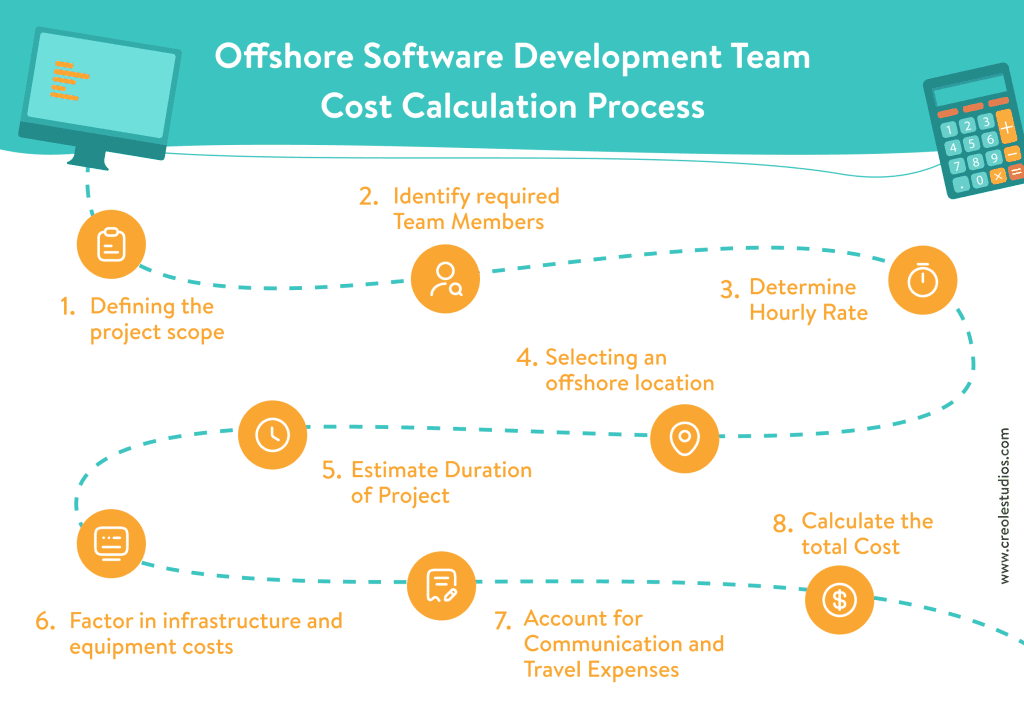
Offshore Software Development Team Cost Calculation Process:

To determine the cost of an offshore software development team, several key factors must be considered. The process involves several steps, which include:

Defining the Project Scope

This involves specifying the project’s requirements, such as desired features, functionalities, and outputs that the offshore software development team is expected to deliver. Clearly defining the scope helps in understanding the exact needs of the project. Free cost estimating software can assist in documenting and refining these requirements, providing a detailed view of the project’s scope. This software helps ensure all stakeholders have a clear understanding of what the project entails and sets the stage for accurate cost estimation.

Identifying Required Team Members

Determine the types of team members needed for the project, including developers, designers, project managers, and QA engineers. Based on the project’s scope, identify the number of team members required for each role. Quotation software can be beneficial in outlining these needs by creating a detailed breakdown of the skills and expertise needed. This helps in forming a well-rounded team capable of delivering the project effectively.

Determining the Hourly Rate

One crucial factor in estimating the cost of offshore software development is the hourly rate of the offshore team. This rate can vary based on the team’s location, expertise, and experience. Cost estimating software can help research and compare hourly rates for comparable tasks in the region where the offshore team is situated. This ensures that the budget aligns with the market rates and helps avoid over or underestimating the costs.

Selecting an Offshore Location

Choosing an offshore location involves considering factors such as cost of living, infrastructure, and the available talent pool. The location significantly impacts the hourly charges for the services provided. Free estimating software can be useful in comparing costs across different locations, helping you select a region that offers the best balance between cost and quality of service.

Estimating the Duration of the Project

Determining the project’s duration is another important step in estimating the cost. The duration can be influenced by the project’s complexity, scope, and the size of the team involved. Free cost estimating software can assist in estimating the time needed by drawing on prior experience or industry standards. This helps in setting realistic timelines and budgeting appropriately for the project’s duration.

Factoring in Infrastructure and Equipment Costs

It’s important to consider costs related to infrastructure and equipment when estimating the cost of offshore software development. These costs include expenses for hardware, software licenses, office space, and internet connectivity. Cost estimating software can help account for these expenses, ensuring that all necessary resources are budgeted for accurately.

Accounting for Communication and Travel Expenses

Regular communication with the client team and potential travel expenses are crucial factors to incorporate into the budget. Offshore software development teams may incur additional costs for phone and internet charges. Moreover, there might be travel expenses associated with team members visiting the client’s location for crucial meetings or project milestones. Free estimating software can help in budgeting for these additional costs, ensuring they are not overlooked.

Calculating the Total Cost

To determine the total cost of the offshore software development team, all the expenses mentioned previously need to be added up. Leveraging free estimating software can simplify this process by providing a detailed breakdown of costs based on your inputs. This comprehensive calculation helps in forming an accurate budget, facilitating better financial planning and management for the project.

Read more: Understanding the importance of software cost estimation in project management. 

How Cost Estimating Software Enables you to Calculate Cost of your Offshore Software Development Team:

The Cost Estimating Software can help you estimate offshore development team costs based on the size of the team you choose based on your project scope. This estimated cost will include the expenses related to hiring project managers, designers, developers, QA engineers, and any other team members required for the project. Once you have reviewed the initial estimate, you can adjust the project details such as the team size to modify the cost of assembling an offshore software development team. Using the software cost calculator, you can determine your project budget and gain a clearer understanding of the costs involved in offshore software development.  Many businesses leverage this free estimating software to enhance accuracy and transparency in their cost calculations.

Read more: Factors to consider when choosing a software development cost calculator

Benefits of Software cost Calculator to determine Offshore Software Development Team Cost:

software cost estimation can be a valuable tool in determining the cost of an offshore software development team. Here are some of the benefits of using a software cost calculator:

  1. Accuracy: Providing an accurate estimation of the cost of an offshore development team can be achieved by utilizing a software cost calculator that considers variables such as team size, project complexity, and location.
  2. Transparency: Using cost estimation software can increase transparency in the costing process, ensuring that all stakeholders are informed of the project’s financial consequences. 
  3. Efficiency: By providing quick estimates, cost estimation software can assist in saving time and effort while evaluating the feasibility and financial viability of a project.
  4. Cost Control:  Utilizing quotation software to generate an accurate cost estimate before initiating work can assist organizations in effectively managing expenses, as well as facilitating improved planning and forecasting capabilities.
  5. Competitive Advantage: By leveraging software cost estimation tools to accurately estimate project expenses, businesses can enhance their competitive advantage and offer clients more cost-effective pricing.
  6. Flexibility: Utilizing software cost estimation tools to evaluate the expenses of different project scenarios enables businesses to compare costs associated with various team sizes, project durations, and other variables.

Incorporating tools like cost estimating software can streamline the cost calculation process.

Overall, a software cost calculator can be a valuable resource for companies seeking to accurately determine the cost of offshore software development teams and to make informed decisions regarding their outsourcing strategy.

How Do I Hire an Offshore Software Development Team?

Hiring an offshore software development team involves several key steps to ensure you select the right team for your project and manage costs effectively. 

Define Your Project Requirements: Before beginning the hiring process, clearly define your project’s scope, including the features, functionalities, and expected deliverables.

Research and Shortlist Candidates: Conduct thorough research to identify potential offshore software development teams.

Evaluate Team Expertise and Fit: Assess the expertise and cultural fit of the offshore teams you are considering. Review their portfolios and case studies to ensure they have experience with similar projects. 

Request Proposals and Quotes: Request detailed proposals and quotes from the shortlisted teams. Ensure that the proposals include a breakdown of costs, timelines, and deliverables. Free estimating software can streamline this process by providing you with a template to compare different proposals easily.

Review and Evaluate: Upon project completion, review the results and evaluate the performance of the offshore team. This feedback will be valuable for future projects and can help you refine your cost estimation and hiring process.

Conclusion:

Accurately calculating the cost of an offshore software development team is essential for effective project management and budgeting. By defining your project scope, identifying required team members, determining hourly rates, estimating project duration, and considering infrastructure and communication expenses, you can achieve precise cost estimation. Leveraging cost estimating software simplifies this process, providing tools for documentation, comparison, and detailed breakdowns of expenses. This ensures transparency and helps businesses make informed decisions, manage expenses effectively, and maintain a competitive edge. Incorporating these steps will lead to a successful and cost-efficient offshore software development project.

Source: Creole Studios

Friday, July 19, 2024

Pros and Cons of Using Free Cost Estimating Software

Accurate cost estimation is crucial for the success of any software development project. It allows businesses to plan budgets effectively, allocate resources efficiently, and avoid unexpected financial issues. Cost estimating software is essential for this process, providing tools to predict and manage project costs. While premium options are available, free cost estimating software offers a cost-effective alternative. This blog explores the pros and cons of using free cost estimating software to help you make an informed choice.

What is Free Cost Estimating Software?


Free cost estimating software refers to tools available at no cost that assist businesses in predicting and managing project costs. These tools typically offer basic functionalities for inputting variables like labor, materials, and time to generate cost estimates. They can come as standalone applications, part of a broader project management suite, or cloud-based solutions. Additionally,
free ballpark cost estimation features often allow users to get rough cost estimates quickly, providing a general idea of project expenses without detailed input requirements.

What Can Free Cost Estimating Software Do?

Choosing a free cost estimating software provides essential functions for project cost management. It helps in creating detailed budgets by estimating costs for different project components. It also assists in resource allocation, monitors ongoing project costs, and generates reports. Users can compare various scenarios to see their impact on project costs and track expenditures against estimates.

Pros of Using Free Cost Estimating Software

1. Cost Savings

Free cost estimating software is entirely free, providing significant cost savings for businesses. This is especially beneficial for startups and small enterprises with limited budgets. The money saved can be redirected to other areas such as development, marketing, or training, making it an attractive option for cost-conscious businesses.

2. Accessibility

These tools are easily accessible, allowing businesses to start using them almost immediately. Many free cost estimating software options are designed to be user-friendly, accommodating varying levels of technical expertise. With online tutorials and community forums, users can quickly get up to speed and utilize the software effectively.

3. Basic Functionality

Free tools typically offer core features necessary for cost estimation. These include budgeting, cost tracking, and basic reporting capabilities. For small to mid-sized projects, these functionalities may be sufficient without requiring advanced features or a financial investment.

4. Community Support

Free cost estimating software often has active user communities. These communities provide valuable support through forums, tips, and troubleshooting advice. Engaging with these communities can help users overcome challenges and enhance their use of the software, benefiting from the collective knowledge of other users.

5. Flexibility

Free software often comes with fewer restrictions on usage, allowing businesses to adapt it to various projects and industries. This flexibility enables businesses to explore different tools without financial commitment and switch to other options if needed, making it easier to find the right fit for their needs.

Cons of Using Free Cost Estimating Software

1. Limited Features

Free cost estimating software generally lacks advanced features available in paid versions. Features like integration with other tools, advanced analytics, and custom reporting may be missing. For complex projects requiring detailed analysis or customization, these limitations can be a significant drawback.

2. Scalability Issues

Free tools may not handle large-scale or complex projects well. As projects grow or become more sophisticated, businesses might outgrow the software's capabilities. This can necessitate a transition to a more robust solution, which may involve additional costs and effort.

3. Support and Updates

Customer support for free software is often limited, posing challenges when issues arise. Additionally, updates and bug fixes might be infrequent, leading to potential compatibility and security concerns. Without regular updates, the software may lack new features and improvements available in paid alternatives.

4. Data Security

Data security can be a concern with free software, which may lack robust security features. Free tools might not offer adequate encryption or secure storage, increasing the risk of data breaches. Businesses handling sensitive information should consider whether the software meets necessary security standards.

5. Reliability

Free cost estimating software can be less reliable, with risks of crashes or data loss. There is no guarantee of continued availability or maintenance, and the software might become outdated if developers stop supporting it. This lack of reliability can impact project management and increase challenges in cost estimation.

Conclusion

Free cost estimating software offers a cost-effective solution for businesses, particularly those with limited budgets or smaller projects. It provides essential functionalities and saves money, making it an appealing choice. However, it's important to recognize the limitations, such as reduced features, scalability issues, and potential support and security concerns. Evaluating your specific needs and the software's capabilities will help you determine if a free tool is suitable for your business. For more complex projects or growing enterprises, investing in paid software with advanced features and reliable support may be a better option. Understanding these factors will help you select the best tool for accurate cost estimation and successful project management.


Thursday, July 18, 2024

Best Practices for Using Free Estimating Software Effectively

In today’s competitive business environment, accurately estimating project costs is crucial for staying on budget and ensuring profitability. Free estimating software can be a valuable tool for businesses of all sizes, providing a cost-effective way to streamline the estimation process. This blog will explore best practices for using free estimating software effectively, ensuring you maximize its benefits while avoiding common pitfalls. We will cover understanding the software, setting it up correctly, best practices for effective use, and how to maximize its value.

Understanding Free Estimating Software

Free estimating software, often referred to as cost estimating software or quotation software, is designed to help businesses predict the costs of projects with greater accuracy. These tools typically include features such as cost databases, templates, and reporting capabilities, making it easier to compile and analyze data. By automating many of the tedious aspects of cost estimation, free estimating software can save time and reduce errors.

However, not all free estimating software is created equal. Some may have limitations in terms of functionality or scalability, while others might require an upgrade to a paid version for advanced features. It's essential to evaluate different options and choose the software that best fits your business needs.

Setting Up Your Free Estimating Software

Setting up your free cost estimating software correctly is the first step towards effective use. Here are some key steps to consider:

  1. Choose the Right Software: Research and select a free estimating software that meets your specific requirements. Consider factors such as user interface, features, ease of integration with existing systems, and customer support.

  2. Import Data: Populate the software with relevant data such as historical project costs, labor rates, material prices, and any other cost-related information. Accurate data is critical for generating reliable estimates.

  3. Train Your Team: Ensure that all team members who will be using the software are adequately trained. This might involve conducting training sessions, creating cost estimation guides, or providing access to vendor resources.

Best Practices for Effective Use

To get the most out of free estimating software, follow these best practices:

  1. Regularly Update Data: Keep your cost databases and templates up to date with the latest information. This ensures that your estimates are based on current market rates and conditions.

  2. Customize Templates: Customize estimation templates to suit different project types and business needs. This can help standardize the estimation process and improve accuracy.

  3. Leverage Automation: Take advantage of the automation features offered by the software. This can include automated calculations, report generation, and data analysis, which save time and reduce the risk of errors.

  4. Collaborate Effectively: Use the software’s collaboration features to involve all relevant stakeholders in the estimation process. This can improve the accuracy of estimates by incorporating diverse perspectives and expertise.

  5. Monitor and Adjust: Continuously monitor the performance of your estimates against actual project costs. Use this information to adjust your estimation processes and improve future estimates.

Common Pitfalls to Avoid

While free estimating software can be a powerful tool, there are common pitfalls to be aware of:

  1. Overreliance on Software: While the software can automate many aspects of cost estimation, it’s important not to rely solely on it. Human judgment and expertise are still crucial for making accurate estimates.

  2. Ignoring Software Limitations: Be aware of the limitations of your free estimating software. For example, it might not include advanced features like risk analysis or integration with other business systems. Understand these limitations and find ways to work around them.

  3. Inconsistent Data Entry: Inconsistent or inaccurate data entry can lead to unreliable estimates. Establish clear guidelines for data entry and ensure that all team members follow them.

  4. Lack of Training: Insufficient training can lead to incorrect use of the software and poor estimation outcomes. Invest in training and support to ensure that your team can use the software effectively.

Maximizing Value from Free Estimating Software

To maximize the value of your free cost estimating software, consider the following strategies:

  1. Integrate with Other Tools: If possible, integrate your estimating software with other business tools such as project management, accounting, and CRM systems. This can streamline workflows and improve data accuracy.

  2. Seek Vendor Support: Take advantage of any support or resources offered by the software vendor. This might include online tutorials, user forums, or customer support services.

  3. Regularly Review and Improve: Continuously review and improve your estimation processes. Gather feedback from your team and use it to make necessary adjustments to your software setup and workflows.

  4. Explore Upgrades: If your business grows or your needs become more complex, consider upgrading to a paid version of the software. Paid versions often offer advanced features and greater scalability.

Conclusion

Free estimating software can be a valuable asset for businesses looking to improve their cost estimation processes without incurring additional expenses. By understanding the software, setting it up correctly, following best practices, and avoiding common pitfalls, you can maximize its benefits and make more accurate and reliable estimates. Remember that while the software can automate many tasks, human expertise and judgment are still essential for achieving the best results. With the right approach, free cost estimating software can help you stay on budget, improve profitability, and enhance your overall project management capabilities.

Thursday, May 2, 2024

AI Chatbots for Universities: Redefining Student Interaction and Engagement


Summary

Artificial Intelligence (AI) chatbots are revolutionizing the way universities connect with students, enhancing interaction and engagement in higher education settings. The conversational proficiency of AI Chatbot Development Services is pivotal to their success. This piece delves into the transformative potential of AI chatbots in university student interaction, covering their development, functions, deployment strategies, uses, advantages, and notable case studies.

How Universities Can Use AI Chatbots to Connect with Students and Drive Success?

As universities implement AI Chatbot Development, student communication and support services undergo significant streamlining. These virtual assistants promptly address inquiries regarding admissions, courses, campus facilities, and academic resources, thereby enhancing student satisfaction. Through AI chatbots, universities improve accessibility, efficiency, and engagement in student interactions, ultimately fostering higher academic success and retention rates.

The Role of AI Chatbots in Modern Education

AI chatbots play a significant role in modern education. Here are some key roles that AI chatbots fulfill in education:

  • AI chatbots offer round-the-clock assistance to students, enhancing accessibility and providing instant help whenever needed.
  • By analyzing student data, chatbots deliver tailored learning experiences, optimizing engagement and learning outcomes.
  • Chatbots streamline grading and feedback procedures, guaranteeing prompt assessment and tailored guidance for students. They play a supportive role in student learning within higher education.
  • Utilizing machine learning, chatbots adjust learning materials based on individual student needs, pacing, and strengths.
  • Chatbots streamline administrative tasks for educational institutions, handling inquiries, scheduling, and course management.

Implementing AI Chatbots in Universities

Implementing AI chatbots in universities can be a valuable addition to the institution’s technological infrastructure. Here’s a comprehensive guide on how to go about it:

1. Identify Objectives: Determine the specific objectives you want the AI chatbot to achieve. This could include improving student engagement, providing quick access to information, offering support services, etc.

2. Choose the Right Platform: Selecting the right AI framework for your chatbot is crucial. You have several options, such as custom development using programming languages like Python and libraries like TensorFlow, or utilizing chatbot development platforms like Dialogflow, Microsoft Bot Framework, or IBM Watson.

3. Data Collection and Analysis: Gather data on frequently asked questions, common student queries, and other relevant information. Analyze this data to identify patterns and determine the types of queries the chatbot should be able to handle.

4. Integration with Existing Systems: Integrate the chatbot with existing university systems, such as the student information system (SIS), learning management system (LMS), and other databases or APIs to access relevant information.

5. Testing and Iteration: Test the chatbot thoroughly to ensure that it functions correctly and provides accurate responses. Conduct user testing with students and staff to gather feedback and make improvements iteratively.

6. Promotion and Adoption: Promote the chatbot to students, faculty, and staff through various channels, such as university websites, social media, orientation sessions, and email newsletters. Encourage adoption by highlighting its usefulness and benefits.

7. Feedback and Improvement: Solicit feedback from users on their experiences with the chatbot and use this feedback to make further improvements and enhancements.

Applications of AI Chatbots in Universities

AI chatbots have diverse applications across various areas of university operations, including:

  • Admissions and Enrollment: Prospective students are guided through the application processes, informed about program requirements, and reminded of admission deadlines to ensure a smooth enrollment experience.
  • Academic Support: Students receive comprehensive assistance with course-related inquiries, access to study materials and resources, and personalized academic advising services to support their learning journey.
  • Campus Services: Navigation support is provided to students to help them find their way around campus, facilitate bookings for campus facilities, manage event scheduling, and access various student support services conveniently.
  • Student Engagement: Students are actively engaged through communication channels with student organizations, promotion of campus events, and participation in surveys and polls to gather valuable feedback and foster a vibrant campus community.
  • Career Services: Students are supported in their career development journey with guidance on effective job search strategies, assistance in crafting resumes, preparation for interviews, and opportunities for networking to enhance their professional prospects.

Read More: The Future of AI Chatbot Development Services in Customer Engagement

Conclusion

In the modern digital landscape, AI Chatbot Development Services stand out as essential resources for universities striving to elevate student interaction and engagement. Leveraging cutting-edge technologies, universities can now offer personalized support, optimize communication processes, and drive student success initiatives with unprecedented efficiency. As AI continues to advance, chatbots are poised to assume an increasingly pivotal role in shaping the future of higher education, fostering a more connected and empowered learning community.

Source: Creole Studios

Wednesday, May 1, 2024

AI Chatbot Training: 10 Best Practices for Enhanced Conversational Skills

Summary

In today’s digital age, businesses are increasingly turning to artificial intelligence (AI) chatbots to enhance customer engagement and streamline interactions. However, the success of AI Chatbot Development Services hinges on its conversational abilities. This article delves into the crucial aspects of AI chatbot training, outlining ten best practices to equip chatbots with the skills needed for effective communication with users.

What is AI Chatbot Training?

AI chatbot training is the process of teaching chatbots to understand and respond to human queries in natural language. This training involves leveraging machine learning algorithms to analyze vast amounts of conversational data, enabling chatbots to recognize patterns, infer user intent, and generate appropriate responses. Through ongoing learning and refinement, AI Chatbot Development ensures that chatbots can progressively enhance their conversational skills, thereby delivering interactions with users that are increasingly accurate and relevant.

What is the Purpose of AI Chatbot Training?

The primary goal of AI chatbot training is to enhance the user experience by providing timely, accurate, and personalized responses to user queries. By training chatbots effectively, businesses can automate customer support, sales, and other functions, thereby reducing response times, improving efficiency, and increasing customer satisfaction. Furthermore, well-trained chatbots can handle a wide range of inquiries, from basic FAQs to complex troubleshooting, freeing up human agents to focus on more specialized tasks. Studies show that 69% of consumers favor chatbots for rapid brand communication, highlighting the crucial role of AI chatbot training.

Read More: AI vs Generative AI: Which is Better for Your Business Needs

How do you Train a Conversational AI Chatbot?

Training a conversational AI chatbot involves several iterative steps:

  • Data Collection: Gather a diverse dataset of conversational transcripts, including user queries and corresponding responses.
  • Data Annotation: Tagging collected data with relevant labels or intents, indicating the purpose or meaning of each user query, is crucial. Research suggests that annotating data can enhance chatbot performance by as much as 30%.
  • Model Development: Develop a machine learning model, such as a natural language processing (NLP) algorithm, to analyze the labeled data and learn patterns in human language.
  • Testing and Evaluation: Evaluate the performance of the trained model using a separate dataset, measuring metrics such as accuracy, precision, recall, and F1-score.
  • Iterative Improvement: Continuously update and refine the training data and model based on user feedback and performance metrics, ensuring that the chatbot’s responses remain relevant and accurate over time.

Read More: Choosing the Right AI Framework for Your Chatbot: A Comprehensive Comparison

10 Best Practices for AI Chatbot Training

1. Understanding User Intent

The Cornerstone of Conversation User intent refers to the underlying purpose or goal behind a user’s query. By accurately understanding user intent, chatbots can provide relevant and helpful responses, enhancing the user experience.

2. Active Listening: Building Contextual Awareness

Active listening involves considering the context of the conversation, including previous interactions and user preferences, to provide more personalized and contextually relevant responses.

3. Incorporating Natural Language Processing (NLP) for Seamless Interactions

NLP techniques enable chatbots to analyze and understand the nuances of human language, including slang, colloquialisms, and syntax, resulting in more natural and fluid interactions with users. States that organizations that leverage NLP in their chatbots experience a 35% increase in customer engagement rates.

4. Empathetic Responses: Building Emotional Connections

Empathy is crucial for building rapport and trust with users. Chatbots can be trained to recognize and respond empathetically to user emotions, acknowledging their feelings and providing appropriate support or guidance.

5. Handling Ambiguity: Equipping for the Unexpected

Ambiguity is inherent in human language, and chatbots must be prepared to handle uncertain or unclear queries gracefully. This may involve asking clarifying questions, providing multiple response options, or offering suggestions based on context.

Read More: 10 Essential Steps to Excel in Enterprise AI Chatbot Development Services

6. Providing Clear and Concise Information

Effective user engagement hinges on clear and concise communication. Chatbots must convey information directly, avoiding jargon and unnecessary verbosity to prevent user confusion or frustration. Clear and concise chatbot interactions have been shown to boost customer satisfaction rates by up to 20%.

7. Integrating Personality and Brand Voice

Infusing chatbots with a distinct personality and brand voice helps to humanize the interaction and reinforce brand identity. Whether friendly, professional, or playful, the chatbot’s tone should align with the organization’s values and communication style.

8. Continuous Learning and Improvement

Chatbots should be designed to learn from each interaction, updating their knowledge base and refining their responses over time. By incorporating feedback loops and performance monitoring, businesses can ensure that chatbots remain adaptive and responsive to evolving user needs.

9. Stay updated on AI advancements

The field of AI is rapidly evolving, with new techniques and technologies emerging regularly. Businesses need to stay informed about the latest advancements in AI, such as advancements in deep learning, reinforcement learning, and transfer learning, and incorporate these innovations into their chatbot training strategies.

10. Testing and Quality Assurance

Regular testing and quality assurance are essential to ensure that chatbots perform as intended and deliver a positive user experience. This may involve conducting user acceptance testing, monitoring key performance indicators (KPIs), and soliciting feedback from users to identify areas for improvement.

Conclusion

Effective AI chatbot training is critical for enhancing conversational skills and delivering exceptional user experiences. By following the best practices outlined in this article, businesses can empower their chatbots to engage users effectively, streamline interactions, and build lasting relationships with customers. As AI technologies continue to advance, investing in AI Chatbot Development Services will become increasingly vital for businesses seeking to stay competitive in the digital marketplace.

Source: Creole Studios

App Cost Calculator: How to Get an Instant Price Estimate for Your Next Project

App Cost Calculator: How to Get an Instant Price Estimate for Your Next Project Introduction Planning to develop an app but unsure about t...