Thursday, November 3, 2022

Advantages of SaaS Application Development

Quick Summary:  In a business environment, SaaS is a compelling alternative to installing software on-premises (the traditional method), which requires the creation of the server, installation of the application, and configuration. As a result, the applications are hosted on a remote cloud network that is accessible via a web browser or API, just as if they were rented out. This software can be used by you and your organization for some time, and you will be responsible for paying for it.  Learn more about the advantages of Software as a Service (SaaS).

Technology and business models are both evolving quickly, so it’s important to consider long-term perspectives and effects while choosing the best software for a given situation. The key goal is to have maximum product adaptability so that business owners may stay current and remain competitive. 

In 2021, the SaaS market was estimated to be worth approximately 152.18 billion U.S. dollars and reach 208.1 billion U.S. dollars by 2023! If you are not already a part of this breakthrough technology, you may want to join the bandwagon.

Why does your business need a SaaS application?

  • Have you been thinking about how you can increase the sales of your company?
  • Are you losing customers due to poor customer service?
  • The product could be improved by an app 
  • You are part of the mobile generation (everyone loves their phones).
  • Are you looking for scalability with barriers? 

There is a huge variety of software available right now. Many software development companies provide custom and off-the-shelf solutions, as well as SaaS (software as a service) applications. Let’s take a closer look at the advantages of SaaS applications. 

Advantages of SaaS Application Development for Your Business

Many large corporations and small organizations are embracing the automated business model strategy. 

“Why is saas important” is a common question that businesses ponder over before any investment.

Let us look at some exceptional advantages of SaaS Application Development:

1) Easy Customization:

Ease of customization is considered one of the primary advantages of saas application. Let us learn why. 

With SaaS applications, the number of customization options available is endless. You can choose software and applications that complement the particular layout of your company.

Since SaaS aims to give users software and applications tailored to their preferences, users can request specifications and upgrades along the way because the entire system is online and accessible anywhere. 

benefits-of-custom-saas-application-development

2) No additional hardware costs:

Small businesses might not have the initial funds available to invest in hardware. With SaaS, one can purchase advanced software without paying for expensive high-tech hardware. Since the entire application is maintained and operated by the cloud service provider, the end user will not have to worry about initial setup costs. 

Furthermore, an ongoing expense concerning applications and software is their timely maintenance and upgrades, which are also done virtually through the cloud. 

3) Multi-tenant architecture:

Even though SaaS allows the user to customize the app to suit their needs, the user cannot change the basic code of the application. In a Multi-tenant architecture, the vendor sells its software to multiple tenants, representing the SaaS User. 

With such a system, multiple users share the same database and resources simultaneously. In this arrangement, tenants save money and time since the vendor handles hardware and updates related to the application.

Tenants find multi-tenant architecture particularly cost-effective since it gives them access to state-of-the-art software at a competitive price with automatic updates and upgrades.

4) Better global access:

Installations of some software are limited to a particular computer or IP address. It could be a problem if you travel, move your business elsewhere, or hire staff from other locations and nations. 

With SaaS, users can access the software remotely as long as they have an internet connection and login details. For a business, this will increase productivity and reduce employee cutback since it gives them the benefit of working from anywhere without being physically present in the office. 

Furthermore, since every user gets a uniform code, it will be easy for the business to collaborate on projects without experiencing technical difficulties.

5) Cross-device compatibility:

SaaS is not restricted to a specific device or location. Since the software is available online on the cloud, anyone can access it, regardless of their device, whether a laptop, computer, tablet, or mobile phone. The software compatibility with numerous systems ensures that the user experience is unaffected. 

With the variety of operating systems and devices, it is a challenge for software developers to design code that can function smoothly on every platform. With SaaS, this benefit is incomprehensible for app developers. 

6) App integration:

Application Programming Interface is the interaction between the client and the server. The server is the app, and the client is the query the user types in the app.

SaaS users can comfortably integrate their working model with SaaS providers, making it one of the best advantages of SaaS.

The sophisticated APIs enable the vendor and the user servers to access the interface without errors.

7) Scalability & flexible payments:

SaaS comprises web-based applications; thus, it is possible to add new features to accommodate the requirements of your expanding company. The system becomes more advanced due to these software and application updates, which lowers the likelihood of data loss while simplifying periodic maintenance through data backup and bug patching. Hence, you can upscale or downscale SaaS! 

Unlike traditional software, SaaS offers freedom concerning payment arrangements, where you must buy pricey, lifelong licenses that may not be used for more than a year. For instance, if you require more storage, you may buy it on the cloud. Additionally, you may simply cancel your subscription for any paid-for features you no longer need.

8) Ease of management:

Every software has technical problems, and with conventional software, it can take days or even weeks to fix the problem. With SaaS, the vendor and the consumers are bound by Service-level agreements highlighting the responsibilities of the service provider and the client.

It also discusses the anticipated turnaround time for answering questions and providing the appropriate response. Because it offers clients legal protection and accountability, the workflow is maintained, and the business’s productivity is not compromised due to software quality issues. 

This brings us to the end of the advantages of the SaaS application. Apart from the aforementioned software-as-a-service benefits, flawless updates assured security, and long-term client relationships are also substantial advantages. 

Conclusion:

Affordability, accessibility, flexibility, accountability, and scalability are some of the main reasons why SaaS is important in today’s business. Whether you are a start-up or a large enterprise, using the right software can save you time and money while increasing the overall efficiency of your team.

To make the process easier for you, Creole Studios as a SaaS software development company can lend a hand with its best-in-class and ROI-focused SaaS development services.

Get in touch with us to hire SaaS developers to develop tailor-made digital solutions.

[Original Source: Advantages of SaaS Application Development ]

Wednesday, November 2, 2022

How to create an MVP to launch your SaaS application easily

Quick Summary: Any new application can fail due to misinterpreted customer demands or coding issues. As SaaS presents one of the best market opportunities to launch an application, businesses launch a minimum viable product with vital features before releasing the application on a large scale. This enables them to record the feedback, comprehend the market thoroughly, and gain insights to improve the overall application.

Due to increasing digitalization, SaaS development has rapidly emerged as a promising market. Fortune Business Heights predicts that by 2028, the SaaS market will be worth USD 716.52 billion! Making your product stand out in such a competitive industry may prove challenging. Making your product stand out in such a competitive industry may prove challenging, and launching a minimum viable product first can come to the rescue.

With SaaS MVP development, vendors focus on releasing a tester product-in this case, an application with core functionality- so that researchers and analysts may examine how well the features in the application perform.

This blog examines the specific benefits MVPs could provide SaaS products and the considerations you should make when developing a minimum viable product.

Why Build an MVP?

Even though every company performs thorough market research before developing a product, the product may still fail in the market. Thus, before investing a large capital in it, business owners can use the SaaS MVP to verify and validate their application or software with a sizable customer base. 

It helps to provide insight into the mind of end users to comprehend the preferences and grievances of the target audience to interrelate and innovate the final product. 

Often, MVP can also demonstrate business potential. If the consumers love the MVP version of the software, it will secure support from stakeholders and investors. 

The three key advantages of an MVP can be summarized as follows:

1) Gets feedback to improve the application and make it distinctive in this lucrative market

2) To gain confidence from investors and stakeholders

3) Encourage the target market to subscribe by endorsing and exhibiting the product.


The Step-by-step guide to planning a minimum viable product:

Wondering how to build MVP? We got you covered!

To understand the target audience’s needs and to design a product that fits the market, we have listed a detailed guide to assist your journey in MVP software development. 

Identify and Understand Your Business and Market Needs

The importance of market research in MVP can not be understated.  Launching an app similar to the already available one will not be a profitable venture; hence, it is crucial to evaluate the market and gather intel. 

Furthermore, it is also important to study the competitors and keep updated with the current trends and technology to always be ahead in the game.

Long-Term Goals

Once you have tapped into the market’s needs, you need to ask yourself these questions that determine your long-term goals. Up to 95% of start-up businesses fail due to their lack of planning. You can avoid being by answering a few questions before venturing into product development.

  1. What am I trying to achieve with this app
  2. What is the future of this application five to ten years from now
  3. What makes my software/application unique

Success Criteria

The next step in the journey is to understand the success criteria of the application. How do you plan to determine that the application is a success? These criteria must align with your company goals. 

Are you looking for loyal customers and subscribers? Or Do you think the overall revenue generated is a measure of success? Or is completing the app on schedule and within budget your definition of success?

Map Out User Journey

The success of the application is directly proportional to user satisfaction. If the app is not user-friendly, chances are that it will not be used, with the risk of you losing potential customers and investors. 

Hence, it is critical to consider focusing on user journeys and experiences to include functions that appeal to them. A start-to-end user journey should be carefully crafted to ensure a smooth flow.

Identify the User

Before designing the workflow, understand who will be the target audience. Can you fit them into one category? One can group people according to occupation, gender, age, etc.

For example, consider a tool that allows you to find the closest doctors and schedule appointments with them. Every gender and profession will use such an app. Hence, your target audience is more than one category.

Identify the Actions

While developing a SaaS MVP, It is anticipated that the actions or jobs that the user may choose. If the application caters to multiple categories, different categories will expect the application to perform distinct actions. 

Continuing the previous example, if the number of searches and bookings for doctors in Area A is more and Area B is less, you can work on adding more doctors for Area A to meet  the demand.

Identify the Story Endings

Not every user will book an appointment; likewise, the ending may vary for every user. Some users might browse to look for doctors, while others might ask a query using the app.

Create a pain and gain Map

It is critical to construct a pain and gain map to grasp the issues experienced by the consumer and the solution offered by MVP. Customers’ challenges are represented by pain, and the feature that helps to solve them is represented by gain.

The map enables you to identify the core problem users are experiencing, for example, if they struggle to schedule an appointment with a specific doctor because they cannot locate the available times. In this example, customer satisfaction will increase if the application makes appointment scheduling simpler by giving users access to all available time slots.

Decide What Features To Build

Since an MVP is created by collating a few features, not everything the customer wants should be on your priority list. The developer should balance what the user requires with what the user wants to produce a feasible MVP for SaaS.

things-to-consider-while-developing-an-mvp-application

Benefits of SaaS MVP Development:

SaaS MVP development gives businesses a safe and secure route to slowly launch their product in a market without incurring a major financial loss. 

Recognize the Feasibility of an Idea

Even if you think your application is perfect for the market, testing your idea on an open platform is necessary. It gives you an insight into whether your idea is sustainable and compatible enough to gain new customers. 

Save Significant Resources

A complete SaaS software requires a team of professionals to build software with multiple features that appeal to the customer. Hence, it requires a generous budget, time, and resources.

However, there is always a risk of the end product not being appreciated in the market. Since MVP is a small-scale version of the software with only key functionality, it requires less time and money and can help you understand the future of the software.

Collect Rapid Customer Feedback

MVPs can allow users to use and evaluate an application in real time. The developers can ask the customer to rate the application and give feedback. Collecting such data will result in early bug fixes and can help remove additional features that are not necessary for the final version of the product.

Building an Efficient SaaS MVP Development

MVP can be considered as the prototype of the actual application. The real-time user feedback can assist in further improving the MVP. It might also help to research the rapidly expanding SaaS market to launch a solution that answers an unanswered pain point in the market.

Define the Market Trends and Customer Requirements

You can push the software into the development zone if the customer is satisfied with the MVP. Since the product is already tested in the market, there is a massive possibility that with improved features and functionality, it will be a success. 

SaaS MVP Development Cost:

For any startup or an established firm, the developer must estimate the cost of developing an MVP. Everyone thinks their product is the best and can change the market dynamics. However, you should paint a realistic picture and an affordable budget for the MVP model.

It might be challenging to calculate the cost of an MVP because there are so many variables involved in the prototype-building process. For example, the kind of team selected to develop the application, the business goals, the number of features they plan to establish, etc.

However, you must select a developer with experience in preliminary app development who can cater to your needs.

Conclusion:

If you are new to the concept of SaaS MVP, it may intimidate you with all the specifics and technicalities one must monitor before launching it in the market. So, make sure to create products and test your audience to launch successfully in the market. Here at Creole Studios, we will assist you in converting your imaginative product into a reality.

With our rich talent pool of SaaS application development services, we can help you design stunning MVPs to align with your business model at an affordable cost. Get in touch with Creole Studios to discuss your MVPs features.

[ Original Source: How to create an MVP to launch your SaaS application easily? ] 

Tuesday, November 1, 2022

Cloud-based vs Web-based applications (Key Differences)

Quick Summary: You’re probably not sure what cloud-based and web-based applications mean, but you know they both sound essential. One of the most important factors to consider in technology is security. You want to know that your information is safe and your data isn’t compromised. Find the difference between web apps vs. cloud apps. Read more to see what we recommend and what is safer for you.

Until the start of the current millennium, the concept of cloud-based and web-based applications were unknown. Because previously, most application developments relied on server-side solutions without using the internet, but people are still confused between the two terms. Even this situation is faced by various people, from consumers to large multinational companies. So, let’s discover the difference between cloud-based and web-based applications through this blog.

The mobile app helps the business in specific ways, like increasing customer engagement, optimizing business processes, increasing sales, and many more. It’s a fact that cloud apps and web apps are similar but not interchangeable. There is a noteworthy difference between cloud-based and web-based in terms of scalability, back–end infrastructure, and seamless integration.

What is a Cloud–Based Application?

It is an online running program with elements that store and drive online with some or other processes executed on the cloud. In a cloud-based, the entire user communicates through a web or mobile browser. The data processing is shared via a remote server base and managed with API help.

The user device is only used as an input device in the cloud app and does not interfere with other significant tasks. Besides this, cloud app development enables modern businesses and enterprises to create a product–based applications to enhance customer experience. With time there has been a growing popularity of cloud applications, and its global app market is $133. Billion in 2020, and it will reach $168.6 billion by 2025.

Types of Cloud-Based Applications

Following are some of the types of cloud-based apps:

Netflix - SaaS

The Netflix subscription service is a perfect example of a SaaS that offers a service to watch licensed videos on demand. This is how the SaaS industry got its start, even though it was referred to as a time-sharing system at the time.

AWS EC2 - IaaS

AWS Elastic Compute Service is IaaS. This is because it handles networking, storage, and virtualization. Amazon EC2 is a cloud computing service and the only IaaS offered by AWS.

AWS Elastic Beanstalk - PaaS

Using AWS Elastic Beanstalk, you can develop and scale web applications. It allows you to build application code and make it run while providing the supporting architecture and compute resources you need.

Benefits of Cloud-based Application

The cloud-based application is helpful for any business since remote servers take care of most data storage and processing issues.

Cost-saving:

The cloud services will charge only for the necessary cloud space and elements set according to the application development model. This pay–as–you–go system applies to every cloud deployment service that factors in lower cost and offers higher results.

Security:

Cloud software applications are more secure than desktop applications. If users download something, there is no chance of malware attack and putting the business at risk.

Cloud software development makes it easier to comply with government standards. Besides this, cloud applications provide helpful insight into the companies using them and how they use their resources.

Scalability:

Cloud application makes it easy to scale according to customer demand. It is because demand isn’t tied to physical resources on–site, and developers don’t require investing in the capacity they need.

What is a Web-based Application?

A web application is a computer program primarily working in online and offline modes. It is stored on the server that provides its content via a web application interface, and multiple tasks are performed via a web browser. Typical examples are online auctions, wikis, messaging apps, email, online retail sales, and many more.

Types of Web Applications

The vast IT business market for web-based software is already shifting to web applications. As we all know, many multinational companies use web apps but don’t use similar types of apps. Every business’s needs vary from one another, so the need for customized apps differs. Thus, we are here to present six different types of web applications.

Single page application:

Single-page applications are dynamic web applications that do not require browser reloads and function as a single unit of a website application. It is applied to all the business and technological strategies in the client-side browser, so the web apps perform pretty fast.

Multi-Page application:

It includes multiple pages and reloads the whole page whenever the user navigates to a different page, known as a multiple-page app. The companies like Google Docs and Trello provide multiple services and products. Thus, it allows users to connect in various ways.

Static web application:

This web app is not adaptable and is built with HTML and CSS. But changing content on static web apps is tricky because you need to download HTML code, change it and upload it to the server. The webmaster does this task.

Animated web application:

With this application’s usage, you can display your material with animation effects. These applications provide creativity and different designs unavailable in other applications.

Progressive web application:

These web technologies are created using various languages like HTML, CSS, and JavaScript. However, it is also called cross-platform web applications that use the latest browser APIs, progressive enhancement methods, and features. It offers an experience like a native mobile app.

Content management system (CMS):

In these web apps, the content is constantly updated. A CMS administrator is the person who grants permission for upgrades, modifications, and updates. WordPress is a popular CMS platform for creating commercial and personal blogs, news, etc.

Advantages of using Web-based Applications

Cross-platform compatibility:

Most web-based applications are compatible with other platforms compared to traditional installed software. However, the minimum requirement would be only web browsers which are many. So, you can still run the applications using Linux, Windows, or Mac OS.

Easy installation and maintenance:

Unlike traditional software, which is loaded on each device, web applications run on the host server. However, there is no installation and no local machines. The software will update automatically, and it reduces installation costs and upgradation. Also, it ensures that all users use a similar software version.

Customizable:

In a web application, the user interface is more accessible to customize than the desktop application. Thus, it is easy to update the look and feel of the application to customize the presentation of information to different user groups. So, the user can’t get bored using the same application and can find the perfect look for each situation.

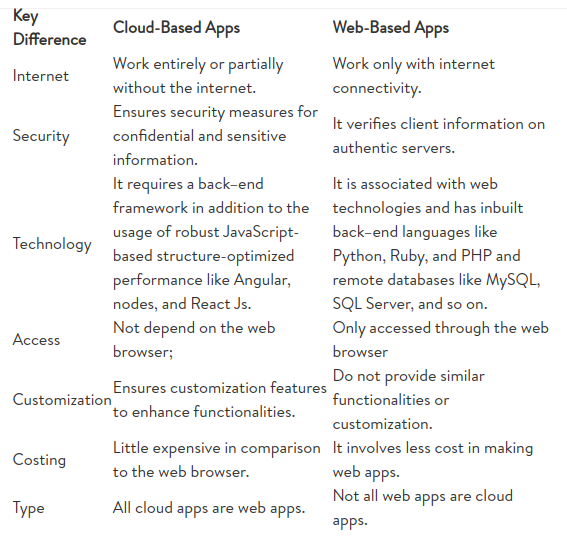
Cloud-based vs. Web-based applications [Key differences]

With your basic understanding of web-based and cloud-based applications under your belt, let’s discuss their differences. So, let’s embark on a debate between web-based and cloud-based solutions.

Conclusion

Web apps and cloud-based apps are used in the integration to deliver a complete solution to the business. Thus, both applications come with various benefits and limitations, so selecting the correct application will depend on business needs, customer preferences, and operations.

However, to gain in-depth knowledge of how vital cloud-based apps vs. web-based apps are in daily life, connect with Creole Studios and get a customized solution for your business.

[ORIGINAL SOURCE: Cloud-based vs Web-based applications (Key Differences ]

Sunday, October 30, 2022

Top 5 SaaS Development Challenges

Quick Summary:  It is easy to overcome SaaS development challenges if you are aware of them and equipped to navigate them. Today we no longer need to install software and contact professionals for updates and maintenance. Companies are now increasingly becoming reliant on Software as a Service, ditching traditional offline software. 

With the emergence of SaaS, it is now possible to automate every system within an organization in order to decrease processing times and improve data accuracy. As per recent statistics, 99% of businesses use at least one SaaS solution. 

However, designing and launching an application is not easy, and addressing SaaS development challenges ensure that the application can work smoothly and endure in this competitive industry. Thanks to SaaS development companies, it is now possible to make an application that can give a high return on investment. 

SaaS application development services help organizations with app design, code development, data flow, testing, server deployment, and related paperwork. In this blog, we will look at the many obstacles of SaaS and how to make the process go more smoothly.

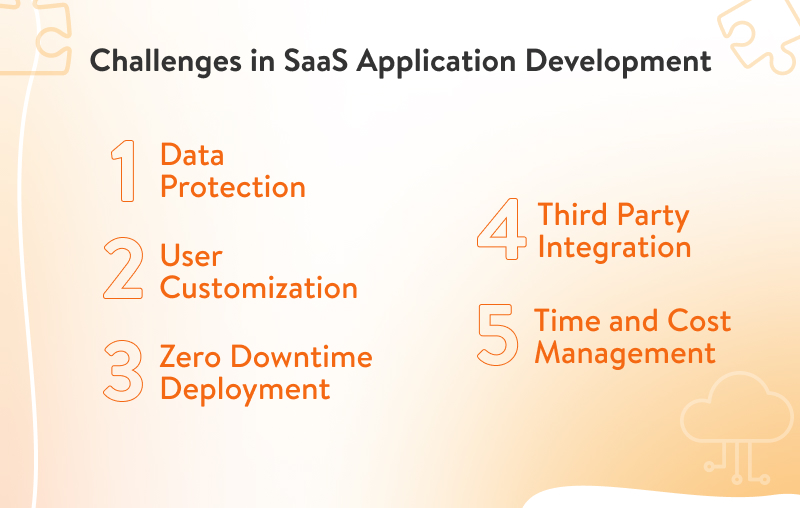
Top 5 SaaS Development Challenges

SaaS applications may be enticing compared to the traditional paradigm due to their accessibility and scalability. However, it still has its share of difficulties and roadblocks as businesses may encounter various general and technical problems that can make their products irrelevant in the industry. It can become easier with the assistance of many prospective SaaS development businesses, but it is best to know all the issues one needs to tackle before developing an application.

Here are 5 major challenges faced while developing a SaaS application.

challenges-in-saas-application-development

1) Data Protection

Saas projects accommodate numerous users on a single server. Hence,  the question of data security can arise. With the multi-tenancy structure of the application, it is crucial that the application can assure the users concerning their data privacy. Additionally, the General Data Protection Regulation has established laws and regulations to guarantee that there are no data security breaches.

The Health Insurance Portability and Accountability Act (HIPAA) and Sarbanes-Oxley (SOX) are a couple of the other codes and standards that may need to be considered while developing apps for certain industries. While the former has standards to safeguard customers’ health confidentiality, the latter has rules and regulations to protect customers’ financial information.

Most SaaS applications like Microsoft and Amazon are Azure and AWS, built on two major cloud-based platforms. Azure is safeguarded by the AI-powered Cloud Defender service that is very active. AWS operates by choosing secure options by default to assure privacy. 

Hence, while developing an application, the developer should amplify the security and ensure that the organization’s data remains safe and secure. 

2) Different User Customization

One of the main advantages of SaaS applications is their capacity to serve a sizable audience through tailoring services that clients expressly require. Even within the same organization, there has to be a difference in the way an application operates from the employee’s front and the manager’s front.   

Not all employees must have access to all functions; hence, developing modifications to suit every user may also be challenging with SaaS. Designing an application that can offer enormous flexibility requires thorough market analysis and data research.

3) Third-Party Service Integration

No SaaS system can exist without third-party Integration. The internet is, by its very nature, a networked device that depends on the tools and systems of other people to function. Hence, developers must buy APIs to enable them to connect with third parties to facilitate smooth functioning. 

Third-Party Service uses APIs to create integrations with multiple applications that offer unique features to the application by connecting them to many other applications. An example to help you understand the concept is Uber. Uber integrates with Google Maps using APIs, making it easier for Uber to run efficiently and for Google Maps to comprehend the route and traffic patterns.

Integration can be difficult as it necessitates numerous manual testing sessions and poses confidentiality issues. To combat that, one must connect with service providers that can essentially guide and assist in the integration process.

4) Zero Downtime Deployment

Users of traditional apps were aware of the downtime they would experience when the application underwent maintenance and upgrading. Back in those days, people planned their work based on these notifications.  

SaaS works by letting numerous users use the same server and services on various platforms. SaaS deployment strategy should ensure that the final code can execute without stalling or undergoing graphical glitches.

Nobody wants an application that will cease functioning during an upgrade or if the servers go down for another reason. Everyone wants to invest in something with zero downtime in this fast-paced economy.

5) Time and Cost Management

Time is Money! Therefore, writing code and creating a usable application in the least amount of time may be tough. It is also essential to release an application that meets the current demand due to the unpredictability of the market. 

Suppose you wait two years to release your application. In that case, a comparable, if not identical, product may already be making its rounds in the market owing to technological innovation and increasing competition. It is also possible that after two years, demand will shift, and hence the application will be useless to the current market trends. 

Another major factor that can be a challenge is the capital invested while creating and integrating the application. It will be a profitable venture if the developer knows the area where costs can be cut without compromising the quality of the application.

One such area is the Integration of the application via an existing service. It requires expertise and qualified and experienced technicians who can work round the clock to ensure that the application will work smoothly on every platform. To save money, developers can go for Integration as a Service (IAAS). 

IAAS is a cloud-based integration delivery model that helps create an architecture that smoothly connects the user with the backend delivery model in the cloud. 

Why choose Creole Studios for your SaaS development project?

At Creole Studios, we have an in-house professional team of SaaS developers that uses cutting-edge platforms and technology to support your company’s aspirations and objectives. Our company offers strong and scalable SaaS development solutions, from conception to formation to execution.

Not only will we help in front-end and back-end app development, but we also employ a specialized quality assurance team to analyze and track the performance of your apps. Contact us to customize a SaaS solution for your company.

[Original Source: Top 5 SaaS Development Challenges ]

Thursday, October 20, 2022

Things To Consider While Developing a SaaS Application

SaaS has many benefits and companies need to think about moving to them. With SaaS, users can easily access cloud-based applications even if they aren’t locally installed, creating a whole new world of possibilities. In this blog, we offer six key considerations for designing and developing a successful SaaS application.

There has been a rapid growth in the SaaS application development industry, which has attracted businesses from many different industries. Thus, more and more organizations are focusing on the development of SaaS applications and moving to the cloud.

Businesses prefer SaaS-based architectures because they offer robust and scalable applications in the cloud for a reduced cost based on pay-per-use. In addition to providing greater business value, SaaS is fundamentally faster.

The SaaS Market grows by 12%  per year, thus developing SaaS applications has become a very lucrative business. It has increased from $31.5 billion to an estimated $171.9 billion since 2015. Since the world is moving toward automation and user-friendly interfaces, these figures will only increase dramatically in the future.

While SaaS first aimed to produce better goods, many of its guiding principles have found their way into marketing and sales teams, changing the way customers interact with the product. Free trials, for instance, were highly uncommon before the development of SaaS but are now quite widespread in the software market.

Things to Consider While Developing a SaaS Application

More applications are continually floating on the cloud by organizations. But what can you do if your company needs a SaaS application development platform? How can you choose the best SaaS app development company to work with? How to develop a SaaS-based application? Are there any factors that must be taken into account when creating such programs, and what purpose do they serve?

top-6-things-to-consider-while-developing-a-saas-application


1) Understand your market audience:

The software cannot be used in a one-size-fits-all manner. Every business needs unique attributes and preferences before investing in any software. Many software developers make an initial attempt to investigate several market segments without using adequate data or researching the industry. It is a significant factor in why many applications do not succeed.

Plan: Consider creating a study abroad application and promoting it in a region where most people are older than 45. Teenagers and adults between the ages of 20-35 are actively looking for educational support. Hence they would be the current and lucrative target group for such software. Hence, it is important to understand the audience your software will cater to.

Research: The creation of SaaS apps depends on new technologies like AI, DL, etc. It is crucial to stay updated with the latest technological advances to design an app that is more sophisticated and quick than its predecessors.

Analyzing the competition: Consider the following before beginning work on the software: What sets my software or application apart from others? Your software should have special features that target an untapped market niche in this aggressive industry.

2) Establish pricing model:

You must set a good pricing model to make your software accessible to numerous tenants. Even if your software is more sophisticated and well-developed than competing versions, users may choose the latter if the pricing structure suits their demands.

It is imperative to set a subscription price that is neither too high nor too low. Furthermore, developers should entice customers by giving free trials and promotional offers.

There are other ways to monetize your software besides subscription. For instance, you can adopt the freemium approach. Numerous SaaS companies give out their software for free with a few features called Minimal Viable Product (MVP).

3) Generate a client acquisition pipeline:

Even if you make the most extraordinary software, it will be useless if you don’t have clients to serve them. Many businesses focus solely on technology while neglecting the client generation part.

Therefore, SaaS Developers must select a team that continually promotes your program on digital platforms, such as through email, social media, banner ads, sales calls, etc., to attract customers and persuade people to subscribe.

A customer acquisition pipeline will guarantee that your product has more customers and business using the power of different channels, and strategies.

4) Plan for scaling from the start:

One of the major advantages of SaaS-based applications is the ability to grow with the business. Hence, it is important to pay extra attention to the scaling-up ability of your software.

The software’s inability to scale up horizontally or vertically will be detrimental in the long run because you risk losing revenue and a valuable subscriber.

Furthermore, the application should be designed to function smoothly in a multi-tenant format to cater to a larger population without sacrificing functionality or confidentiality.

Four multi-tenancy design options that can complement software design are as follows:

- Isolated
- Infrastructure
- Application
- Shared

The above designs allow one to code for the greatest software with commendable scalability characteristics.

5) Select a proper Database:

Although having a large, flexible, and secure database is essential for any app development, it also needs to be of a specific kind that corresponds to the interests of your clientele.

It should be scalable and enable seamless application operation across all devices and platforms. The database type you choose will be influenced by several factors, including your application’s data, scalability limit, expected client count, the ratio of read-to-write operations, coding preferences, and investment.

Developers typically use relational structure query language (SQL) databases for centrally hosted environments, whereas they favor NoSQL database designs for cloud-based environments when storing data.

6) Provide updates frequently:

Nobody likes to use an outdated version of a phone, let alone software! Hence, in this face paced, technologically advanced generation, it is important to provide updates that add value to the software.  Since no software or application is error-free, the developer must constantly try to keep checking the bugs to improve the user experience.

The market is dynamic, so demand for specific features could surge. It is essential to establish a specialized team to monitor such requirements. It is critical to timely upgrade your application with new features and functionality if you want to gratify and retain your clientele.

Some SaaS application development services automate the CI/CD process, checking for problems and continuously upgrading the software to be compatible with the latest technologies while preserving data integrity and safety.

How to find and hire SaaS (Software as a service) developers?

You cannot overlook SaaS if you want to obtain the right software for your business at a fair price that can foster growth and profitability. A useful software will empower your team and streamline operations to foster a scaling up of a business model.

To make the process easier for you, SaaS software development companies can provide you with tailor-made and robust applications compatible with Android, iOS, and hybrid systems. Get in touch with Creole Studios to hire SaaS developers to discuss your SaaS application development needs.

[Orignial Source: Things to Consider While Developing a SaaS Application ]

Monday, October 10, 2022

REACT JS, ANGULAR JS, VUE JS – THE 4W’S OF JAVASCRIPT


Picking out the right framework for web development holds the utmost importance. But before making any decision, it is necessary to know the options. The best ones include React JS, Angular JS, and Vue JS, and if you had to pick one, which one would it be? If that question is lingering in your mind, you are in for a treat with the following article. It explains the different suitable circumstances and audiences for the varying frameworks to help you make an informed decision. 

Frameworks aid faster web development without reinventing the wheel. The onus of choosing the correct JS framework lies on the developer, as it determines the final functionality and efficiency of the product. Such a question leads to a famous confusion- the choice between React JS, Angular JS, and Vue JS. 

But before making any choice, it is always better to clear the basics and understand the individual frameworks.

Brief

Before we get to the technicalities, let us quickly brush up on the foundation and learn the history of the three frameworks. 

React JS 

Jordan Walke, a software engineer at Facebook, created React JS typescript and called it “FaxJs.” While initially deployed on Facebook’s NewsFeed, it was later used for Instagram and has been open-sourced since 2013. 

React programming leverages a declarative paradigm that makes the development process flexible and efficient. Moreover, ReactJS efficiently updates and renders the right components during data changes. 

Websites Built with React JS examples: 

  • Facebook
  • Netflix
  • Salesforce
  • Asana 

Angular JS

AngularJS framework was a side project of MiÅ¡ko Hevery, a Google employee who wanted to make web development less complex for his internal projects. 

AngularJS is used to build dynamic single-page applications. Being a client-side framework, it supports multiple platforms, and all the functions and commands utilize HTML script code templates. 

Websites built with AngularJS examples: 

  • IBM
  • Upwork
  • PayPal
  • Forbes 

Vue JS

Evan developed Vue JavaScript in the process of making single-page applications. It uses adaptable architecture to focus on declarative rendering. 

This JavaScript framework streamlines web development that demands interactive and functional user interfaces. One fun fact that often intrigues individuals about Vue JS is the unique version names

 inspired by manga and anime, preferably from the science fiction genre. 

Websites built with Vue JS examples: 

  • Behance
  • Nintendo 
  • Wizzair
  • 9gag 

When should I use React JS, and when shouldn’t I? 

When to use React JS? 

  • You require broader community support. 

A few roadblocks are a given regarding web building and development. But a reliable backing smoothens the process, and React JS offers the same. 

It has a massive community on GitHub Repository, with over 164k stars and 11M users. Moreover, Reactiflux is a community of more than 170000 React developers. Such a massive community makes it easier for developers to solve their queries.

  • You need ease of testing. 

React JS requires little to no configuration for testing purposes. Moreover, its components can be tested using the node command line, which accelerates the testing time by a considerable amount. 

It is also easy to maintain as the React JS typescript testing can be written with the help of tools like Enzyme and Jest. 

  • You need a mature user base. 

As established companies like Netflix and Facebook are using React UI library, you know that it is reliable and stable. The regular updates and releases are guaranteed, making React JS a trustworthy choice. 

When to not use React JS

On the other hand, React JS typescript might not prove to be a good choice in the following scenarios: 

  • You have a limited time frame. 

React JS rendering function is time-consuming due to the presence of new and virtual DOMs. It is because the React frameworks are unaware of the data sources, leading to guesswork. Since the two versions are mutually independent, the rendering process can become slow. 

  • You require powerful markup language. 

React JS can be wordy and lengthy since it is HTML mixed with JavaScript. While it is easier to learn, using stronger languages might demand more code and development time. 

  • You need lighter applications. 

React JS comes with a lot of code, as the virtual DOM implementation needs a decent amount of code for performance optimization. Hence,  React JS shouldn’t be your choice for building lighter applications. 

When should I use AngularJS, and when shouldn’t I? 

When to use AngularJS 

  • You need code documentation

AngularJS framework is said to have a clean coding system. Not only does it allow you to see the code, but it also shows the code written in the past that expedites the development process. 

  • You need faster web development

Platforms like jQuery make it even easier to write codes in the Angular JS library. In a way, its model-view-controller fastens the web development process. 

  • You need flexibility

Angular JavaScript offers front-end flexibility for faster web development. Along with that, it also offers proper separation of front-end and backend for the developer’s clarity. 

When to not use AngularJS

  • You need SEO 

As the Angular JS framework does not store data on the source, it makes it challenging for bots to fetch the data defeating the idea and purpose of SEO. 

  • You have a tight budget

Since AngularJS differentiates between front-end and back-end, you, as the website owner, will need to shell out more money. This may turn out to be costlier as compared to other frameworks since you will have to hire two different types of developers. 

  • You have a short-term project

Angular JS UI is unsuitable if you have a short-term project deployable in a few weeks. A strong tool framework like Angular JS is not ideal in such circumstances. 

When should I use Vue JS, and when shouldn’t I?

When to use Vue JS

  • You need more developers 

Since Vue JS does not have a steep learning curve, you might find it easier to get more Vue JS developers than other frameworks. 

  • You need fewer restrictions

The combination of the modular approach with the “View” part makes it easier for programmers to solve problems. Moreover, fewer restrictions give the developers more freedom to develop the applications. 

  • You need impeccable support

Despite being comparatively newer, Vue JS has a great community on GitHub. Along with that, the regular release cycles of updates come into use to stay ahead of the competition. 

When to not use Vue JS

  • You have a larger project

Vue framework has been around for fewer years as compared to other JavaScript frameworks. This can raise questions about its overall functionality and efficiency. 

  • You do not know Chinese

Since Vue JS is more popular with Chinese websites like Alibaba and Xiaomi, most of the forum discussions and instructions are only available in Chinese. 

  • You require experienced developers

Circling back to the fact that Vue JS is comparatively young, it can be challenging to find experienced developers. 

React JS, Angular JS, & Vue JS – then and now 

All three frameworks- React JS, Angular JS, and Vue JS have come a long way since their inception. With regular updates and varying versions, all three have made it far easier for developers to indulge in web development in their way. 

For example, when React JS framework got open-sourced in 2013, many “early adopters” considered it to be a great step, only backward. But presently, it is being used by 3.6% of all the websites in the world (Javascript library). 

When it comes to the Angular JS framework is being used by more than 4 million websites in the world. Lastly, 0.7% of the websites are known to use the Vue JS framework. While that number is not as high as the other frameworks, it’s set to hold significant importance in the future. 

React JS is best for? AngularJS is best for? Vue JS is best for?

Before we get to the concluding answer, it is crucial to understand the most suitable applications for the varying frameworks. 

React JS framework is suitable for you if you require: 

  • Single-page applications
  • Mobile or hybrid applications 

AngularJS framework is suitable for you if you require: 

  • Qualitative and dynamic web applications 

Vue JS framework is suitable for you if you require: 

  • Single-page applications 
  • Web interfaces

How to know which framework is best for web development?

As far as React JS vs. Angular JS vs. Vue JS is concerned, it is safe to say that all three frameworks have their sets of advantages and disadvantages. At the end of the day, it undoubtedly comes down to subjective requirements and projects. 

However, the following pointers will make it easier to choose the ideal framework for development: 

1. The complexity of the project 

Instead of making last-minute changes to the project, it is advised to choose a framework that can handle the complexities. 

For example, AngularJS is the best framework for complex projects. You can take the call as per your project requirements.

2. Timeframe of the project 

If your project has strict deadlines, go with a faster JS framework. For example, Angular JS and Vue JS provide speed as far as web development is concerned.

hire-dedicated-developers

3. Community support 

Even the most experienced developer will have certain queries and roadblocks, so it is crucial to have a framework that offers reliable support. 

React JS remains unbeatable when it comes to that aspect. 

4. Maturity of the framework 

Frameworks that have been around for years will have more experienced developers making it easier to find a suitable developer that fits your requirements. 
In terms of experience, Angular JS and React JS are suitable alternatives.

Takeaway 

Choosing an exemplary framework is a prerequisite when it comes to web development. The right choice will help the developers fasten the process, while the wrong one will make the process extremely time-consuming. 

If you have a project in mind and are looking for the correct JS framework, why don’t you let the professionals at Creole Studios handle the stress? Not only will our experienced developers find the ideal framework for your application, but they will also give you the final product in no time while maintaining quality standards.

>>>>><<<<<

Source: Creolestudios.com

Thursday, September 29, 2022

How To Add Two-Factor Authentication To Protect Your WordPress Website

Quick summary: – Are you aware of how popular websites are now offering WordPress 2fa to improve security? Now you can secure your WordPress site with two-factor authentication. As a result, your WordPress site and all its registered users are protected with maximum security. In this article, we will show you how to add two-factor authentication using easy-peasy steps and plugins. 

Creating a WordPress website might be a straightforward process, but it requires hard work, commitment, and dedication. Imagine putting in your efforts to develop your business website on WordPress and getting it hacked. Also, you might be surprised to know that and look around to enhance the security of your website. Hence, your WordPress website’s security can be a matter of life or death. 

Security is of utmost importance as its absence could potentially compromise your website’s sensitive data of your company and users. WordPress 2fa is essential to help you secure your website from getting hacked by malicious actors from getting into your site. 

While there are several ways to protect your WordPress website, the two-factor authentication works like a charm. Here, we will explain the easy steps by which you can add the WordPress two-factor authentication to your website.

What is a Two-Factor Authentication and how does it work?

Two-factor authentication is known as a double verification that is used for authentication for users for a security purpose to verify themselves. Businesses usually add two-factor authentication to websites to enhance the security level of their website. The most common ones include a fingerprint, face, or retina scan, followed by a password or code sent to users’ smartphones to authenticate their identity. Since it requires two separate forms of identification to get complete access to the website, it is known as two-factor authentication.

How does two-factor authentication work?

Just like you take care of your health, you need to make sure that your WordPress website is secured without any risk. There are many security attacks that your WordPress can become vulnerable to, such as brute force attacks and dictionary attacks. 

You can strengthen your website’s security by using unpredictable passwords while using special characters, letters, and numbers. However, to make a highly secured website, implement 2FA. 

So, rather than just relying on your generic passwords, it is best to leverage 2-factor authentication for better security. Moreover, it can work as a boon for people who tend to forget their passwords every other day.

Types of Two-Factor Authentication

With the advent of technology, WP two-factor authentication can be done in a plethora of ways. The following are the most common ones used in professional settings: 

1. Biometric 2FA

Biometric 2FA requires physical authentication in the form of a fingerprint, retina scan, facial feature, hand shape, typing behavior, or voice.

While this is one of the safest 2FA options, it can drill a huge hole in your pocket. At the same time, it can have grave consequences if compromised. 

2. SMS 2FA

SMS 2FA is more useful for websites, including WordPress. It includes logging in with a username and password, after which a code is sent to the registered phone number.

Hence, only someone with access to your username, password, and phone would be allowed to access the website. 

3. Email 2FA

Email two-factor authentication is straightforward. Once you log in to your WordPress account, a code will be sent to your email. Only by verifying the email would you be able to get access to the WordPress account. 

4. App 2FA

App-based authentication will protect your WordPress account when you or somebody else tries to log in from a different device. It will send a code to the original device to authenticate the identity.

why-two-factor-authentication-for-wordpress-website

Advantages of Two-factor authentication for the security of WordPress 

Generally, a WordPress website can be accessed with a username and a password. But, it’s not enough to maintain the security of your website as hackers can easily break this. And we provide hints to hackers by keeping the birthdate as a password. Therefore, you must implement WordPress authentication as it can benefit you in many ways. 

Advantages of two-factor authentication for WordPress security: 

1. Security of your website

WordPress is not just a go-to CMS for small businesses and eCommerce stores. Celebrities like Usain Bolt, Justin Timberlake, Beyoncé, and Sylvester Stallone have WordPress websites. 

No wonder hackers are always targeting WordPress websites. 

By adding 2FA, you shall safeguard your website from such cyber-attacks and maintain the integrity of your hard work. 


Read more: “How to secure your WordPress website from Hackers?”


2. Security of your users 

Getting your WordPress website hacked can compromise all the confidential information added to the website, not just of your company but of your users as well. 

For example, if you run an online store on WordPress, the website will include sensitive information about the users’ names, payment information, address, etc. 

But the addition of two-factor authentication can enhance WordPress security and safeguard the information of your users.

How to add Two-Factor Authentication to a WordPress website?

Adding two-factor authentication is a pretty straightforward process. We have broken it down into (number) easy steps for an easier grasp of it. 

Method 1: Two-Factor Authentication with an authenticator app 

  • Install and activate any of the Best 2FA WordPress plugins. We’d recommend WP 2FA – Two-factor Authentication. 
  • Go to Users—Profile and click on the “Configure Two-factor authentication (2FA)” button. 
  • Choose either a One-time code generated with your app of choice or a one-time code sent to you over email. We’d suggest the former option. 
  • Click Next. 
  • It will show you a QR code that can be scanned with your preferred authenticator app. 
  • Download the app and click on the “Add” button to add your account. 
  • Scan the QR code to help the app save your WordPress website. 
  • Verify your one-time password and note down the backup codes in a safe folder. 
  • Exit and verify whether the two-factor authentication is working or not

Method 2: Two-Factor Authentication for SMS 

  • Install and activate any of your favorite Two-Factor plugins. In addition to that, you will have to get the Two Factor SMS plugin as well. 
  • Go to Users—Profile and click on the “Configure Two-factor authentication (2FA)” button. 
  • Check next to the ‘SMS (Twilio)’ option and the radio button to make this your primary verification system. 
  • Sign in to the Twilio account and click on the “Get Started” button. 
  • Choose SMS as the product, Two-factor authentication, and PHP as your programming language. 
  • Save the Twilio number provided to you and click on “Choose this number.”
  • Exit the wizard and go to settings. 
  • Select the countries. 
  • Go to your WordPress site and enter the Twilio Account SID, Auth Token, and phone number to the user profile. 
  • Now add your number and save all the new information. 
  • Log out and log in with your username and password. 
  • Add the code received via SMS and check the functioning of the two-factor authentication.

List of best Two-Factor Authentication plugins for WordPress

You can integrate the WordPress two-factor authentication plugin with the following plugins, specially chosen by our expert WordPress developers:

1. Google Authenticator

Through the Google Authenticator plugin, you can get two-factor authentication for your WordPress website via the Google Authenticator app. This app is available for Android and iOS. 

More information

2. Two Factor Authentication for WordPress

This plugin allows the users to log into their WordPress website through a one-time code. This is also used by Google Authenticator. 

More information

3. Wordfence

This plugin will help you protect your WordPress websites by country blocking or firewalls. It also limits login attempts to avoid brute-force attacks on your website. Moreover, regular checks are rendered to safeguard the website from sudden cyber attacks. 

More information

4. Shield WordPress Security 

This plugin prevents malicious bots, signals multiple failed login attempts, and limits fake search engine crawlers to protect your WordPress website. 

More information

5. iThemes Security Pro 

Along with 2FA, this plugin provides a security dashboard through which you can stay on top of your website’s security status. 

More information

6. Rublon Two-Factor Authentication

This plugin allows you to integrate 2FA through the Rublon app or via email. If you are using the website from the same device, you need not verify multiple times.

More information

7. 2FAS Prime 

This plugin restricts any unauthorized access to your WordPress website. It provides authentication in the form of one-time passwords. 

More information

8. Keyy Two-Factor Authentication

This plugin works with the KeyKeyy app, through which you can secure your WordPress website by scanning a code. Instead of generic passwords, you can secure your website through RSA public-key cryptography. 

More information

9. Duo Two-Factor Authentication

This plugin provides a plethora of logging-in options. For example, you can securely access your WordPress website via the Duo mobile application (one-tap authentication or one-time codes). It also provides phone callback and SMS codes for better security.

More information 

10. WooCommerce Two-Factor Authentication

This plugin protects your eCommerce WordPress website page from brute force attacks and cyber attacks. This plugin comes to the rescue to protect the sensitive information of your users and customers, along with your website. 

More information

list-of-best-two-factor-authentication-plugins-for-wordpress

Takeaway 

Creating a WordPress website might seem easy, but maintaining and protecting it from hackers and malicious cyber attacks can have you grasping at straws. But you can relieve yourself to some extent by protecting your WordPress website through two-factor authentication. 

If you are having trouble integrating two-factor authentication, you can hire dedicated developers to assist you. Since they have the required expertise and knowledge about WordPress and its security, you will never have to worry about your website being on the receiving end of brute force attacks!


>>>>><<<<<

Source: creolestudios.com

App Cost Calculator: How to Get an Instant Price Estimate for Your Next Project

App Cost Calculator: How to Get an Instant Price Estimate for Your Next Project Introduction Planning to develop an app but unsure about t...